
Building a Game Server in C++ #9: A Client Framework
Now that my game server is at a decent level of development, and I have two fairly simple games to experiment with, I want to concentrate to the client side. Some time ago I came up with a Client class which facilitates the communication with the server. In this article, I want to define a general framework for client game applications.
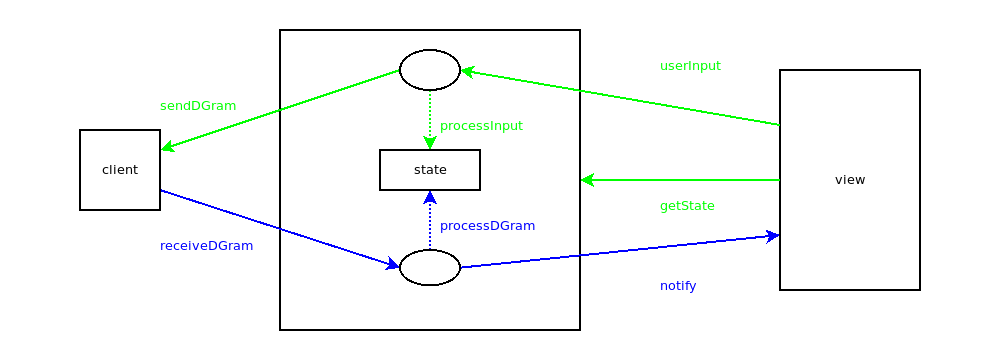
The game state, or at least a part of it, should be mirrored in the client application. A game model is responsible for synchronizing this state with the one on the server, via UDP communication. On the other hand, the game’s view must be able to read the state and give feedback to the user, as well as collect user input and forward it to the model. Both user input and incoming datagrams can affect the state. In the former case, input is translated into a datagram and forwarded to the server, while in the latter, the view is notified that the state has changed.
The above is summarized in the following diagram. The green lines denote actions made by the view’s rendering thread (typically the main one) while the blue ones denote actions made by the client’s UDP handling thread:
Every game type has its own unique state structure, but one common characteristic is whether the game is active or not (ie it is shutting down or has rejected the user). In the following minimum game state, we assume that the game is active by default:
class GameState {

	private:

		bool active=true;

	public:

		bool isActive();
		void deactivate();

};

bool GameState::isActive() { return active; }
void GameState::deactivate() { active=false; }
For convenience, let’s also define a state class for two-player games:
class TwoPlayerGameState: public GameState {

	protected:

		int myScore=0,opponentScore=0;

	public:

		int getMyScore();
		int getOpponentScore();

};

int TwoPlayerGameState::getMyScore() { return myScore; }
int TwoPlayerGameState::getOpponentScore() { return opponentScore; }
Game Models
Every game type corresponds to one game model, and every model to one game type. In other words, a model for a specific game can be combined with an arbitrary number of different views. It is defined by the following factors:
- Its state type (
StateT) - The user input type it expects (
InputT) - The way that user input and incoming datagrams affect the state (
processInput()andprocessDGram()) - The way that it notifies the view (
notify())
Moreover, it must be connected to a Client object, in order to exchange datagrams. Finally, since the game state can be accessed by different threads, it must be protected with a mutex:
template<class StateT,typename InputT>
requires derived_from<StateT,GameState>
class GameModel {

	private:

		Client *client=nullptr;
		mutex stateMutex;

	protected:

		StateT state;

		StateT getState() {
			lock_guard<mutex> lock(stateMutex);
			return state;
		}

		virtual DGram processInput(InputT)=0;

		void userInput(InputT i) {
			stateMutex.lock();
			auto d=processInput(i);
			stateMutex.unlock();
			client->sendUDP(d);
		}

		virtual void processDGram(DGram)=0;

		virtual void notify()=0;

	public:

		GameModel(Client* cl): client(cl) { }

		virtual void receiveDGram(DGram d) {
			{
				lock_guard<mutex> lock(stateMutex);
				processDGram(d);
			}
			notify();
		}

};
This template implements the functions described in the diagram above in a thread-safe way. It also ensures that the model’s state type is a descendant of GameState.
Game Views
As we noted above, a model can be combined with any number of views to provide different interfaces for the same game. In order for a view to be compatible with a model, it must understand the model’s state and input types. However, we must also provide it with a view class for a specific context. Finally, it must implement methods for reading the model’s state, forwarding user input to the model and getting notified when the game state changes:
template<class CtxV,class StateT,typename InputT>
requires derived_from<StateT,GameState>
class GameView: public CtxV {

	using CtxV::CtxV;

	protected:

		virtual StateT getState()=0;
		virtual void userInput(InputT)=0;
		virtual void notified()=0;

	public:

		using state_t=StateT;
		using input_t=InputT;

};
As you can see, we also expose the state and input types. This will become handy later, when we need to bind models with views.
Some (probably most) game views will want to render content regardless of network activity, while others will wait to be notified first. We will call the former active views, and the latter passive. An active game view will access the game state at its own pace, and thus does not need to be notified:
template<class CtxV,typename StateT,typename InputT>
class ActiveGameView: public GameView<CtxV,StateT,InputT>  {

	using GameView<CtxV,StateT,InputT>::GameView;

	protected:

		void notified() override { }

};
On the other hand, a passive game view will typically wait for the server’s response and then render its content. This would apply to views of turn-based games that don’t need to process additional events. For this case, we will need a synchronization mechanism that blocks the main thread until the state is updated with a new datagram:
template<class CtxV,typename StateT,typename InputT>
class PassiveGameView: public GameView<CtxV,StateT,InputT> {

	using GameView<CtxV,StateT,InputT>::GameView;

	private:

		binary_semaphore syncNotified{0},syncRender{0};

	protected:

		void notified() override {
			syncRender.release();
			syncNotified.acquire();
		}

		StateT getSyncState() {
			syncNotified.release();
			syncRender.acquire();
			return this->getState();
		}

};
As we can see, when the view is notified, it blocks the client’s UDP thread on a semaphore until it’s ready to receive a notification again. Although views of this kind can always call getState(), they are not guaranteed to receive a synchronized state or unblock the notification flow. That’s why the new getSyncState() is necessary, which only retrieves the state after syncRender has been released.
Client Games
A client game is a combination of a game model with a game view. In some respect, it can be considered to be the game controller, given that it defines the way they communicate with each other. It must be able to receive UDP datagrams on behalf of the model, and must have an entry point for the user to start playing:
class ClientGame {

	public:

		virtual void play()=0;
		virtual void receiveDGram(DGram)=0;

};
When constructing a game instance, we must provide it with a pointer to a Client object for the model, and a context pointer for the view. The game’s receiveDGram() is a wrapper of the model’s corresponding method, while calling play() essentially means showing the view. Other than that, we must connect the model’s getState(), userInput() and notify() methods to the view’s counterparts:
template<class M,class V>
class ClientGameTemplate: public ClientGame, protected M, protected V {

	private:

		using StateT=typename V::state_t;
		StateT getState() override { return M::getState(); }

		using InputT=typename V::input_t;
		void userInput(InputT i) override { M::userInput(i); }

		void notify() override { V::notified(); }

	public:

		using CtxT=V::ctx_t;
		ClientGameTemplate(Client *cl,CtxT *ctx): M(cl), V(ctx)  { }

		void receiveDGram(DGram d) { M::receiveDGram(d); }
		void play() override { V::show(); }

		static ClientGameTemplate<M,V> *create(Client *cl,CtxT *ctx) {
			return new ClientGameTemplate<M,V>(cl,ctx);
		}

};
Obviously, the model’s StateT and InputT parameters must be compatible with the view’s ones, and the constructor’s context type must in turn be compatible with what the view expects. Finally, create() provides a convenient way to construct game objects of a specific kind.